
Segway Navimow H1500E Robotic Mower: My Review
Read my review of the Segway Navimow H1500E robotic mower, an innovative choice for a hassle-free garden.
Introduction
After my old robotic mower (a Honda Miimo HRM 2500 that was about ten years old) reached the end of its life, I had to look for a replacement. With a particular taste for technology, I was searching for a model that wouldn’t require physical boundaries like a perimeter wire. Even though my garden already had one for my old robot, I wanted a model that wouldn’t have such constraints in case of future changes in the garden layout.
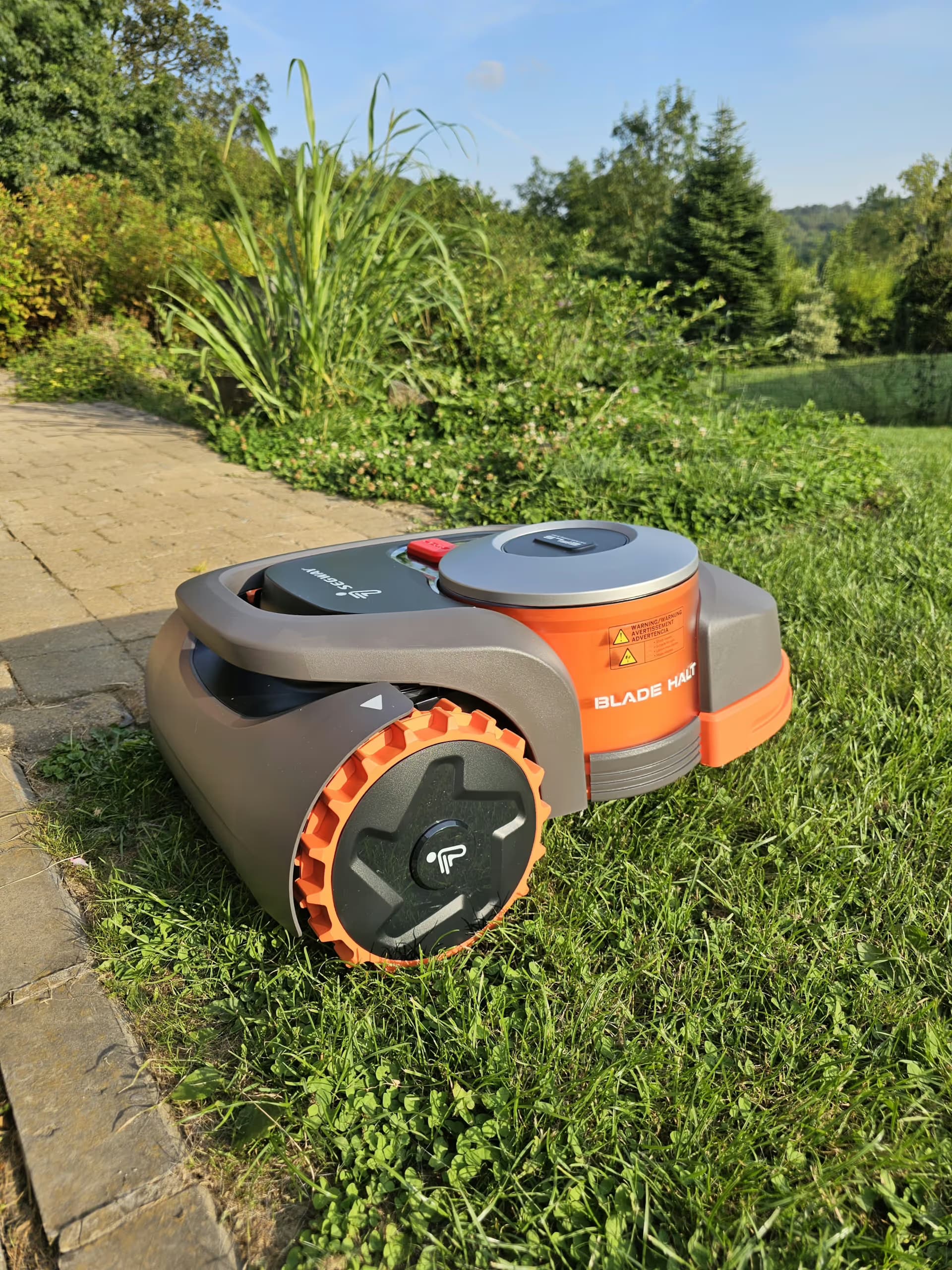
I chose the Navimow H1500E from Segway. This brand, globally known for its innovative gyroscope released in the 2000s, has specialized in producing wheeled devices with electric motors. Following the acquisition of the brand by Ninebot (a Chinese company), we can find in their product range electric scooters, electric scooters, unicycles, and even high-capacity portable batteries.
I selected this model for two specific reasons: first, my garden is about 13 ares (1300m2) and this model is suitable for areas up to 15 ares. The second reason was price-related; indeed, for more well-known brands in the mowing field, we are looking at around €3500 for models that do not require perimeter wires and are suitable for areas up to 15 ares. I found the Navimow H1500E for €2100, including delivery fees. That’s a significant price difference.
Unboxing the Robot and First Impressions
The large package arrived at my home (about 25 hours after ordering, impressive), and it was time to discover the beast.


Everything is carefully packaged, and the box contains all the necessary elements for the robot's operation.

In detail, we can find:
- The user manual
- The power supply
- The RTK antenna
- The antenna stand and its ground fixation trident
- The base fixation screws
- Markers to mark the location of the screws when disassembling the base for winter.
- A ruler to stick on the robot to maintain a 15cm distance from the edge of the area during mapping
- And finally, the charging base
Installing the Robot and Defining the Area
Once everything is unboxed, it’s time to set it all up. First, you need to install the mobile app, create an account, and finally, follow the steps.
The process is very simple and well explained by the app.


The major advantage is that it doesn’t require a perimeter wire; it is equipped with RTK (Real Time Kinetic) technology. This technology, which I detail further in my dedicated article "RTK: GPS, but much more precise!", provides it with accuracy that can reach up to a centimeter. It requires the installation of an antenna that will allow communication between the robot and several GPS satellites to enhance precision.
Once the antenna and base are in place, you then need to define the mowing area(s), and this is done in a rather fun way: we control the robot using our phone like a remote-controlled car and go around the area. Keep in mind to stay at least 15cm from the edge. Once the perimeter is complete, the app saves the map, and the mapping is finished.
Afterward, it is possible to determine areas to avoid, and this is done in the same way.
Mowing and Programs
During mapping, we have the option to configure the robot's mowing method. By default, it chooses a mowing direction to cover the entire area. Once the area is mowed to 100%, the robot adjusts its orientation by a few degrees during the next mowing, ensuring that no part is neglected over the cycles.

I must say that I am completely satisfied with the device. Its precision is impressive, the quality of the mowing is impeccable, and it is remarkably quiet. So far, I have never found the robot outside of its mowing areas: it strictly respects the forbidden zones and the paths I defined to connect one area to another.
The robot is also equipped with a physical rain sensor, which, once activated, stops mowing when it detects moisture. This can sometimes be surprising: I was once puzzled by the mowing stopping in clear weather, while the sensor, having remained wet, prevented the robot from functioning.
Manual Control of the Robot
A few days after receiving my robot, an update introduced the 'manual mowing' function. Now, it is possible to take control of the robot to mow certain parts of the garden manually. Like with a remote-controlled car, you can direct it precisely where you want. This function is particularly useful in hard-to-reach areas: for example, I use it to mow under my children's play module, especially under the ladder, with a precision that the automatic mode wouldn't have allowed.
The App and Updates
The app is both intuitive and aesthetically pleasing, offering easy handling to configure mowing time slots and access all essential features. Updates are regular and bring notable improvements, whether to fix bugs or add new features. The development team seems responsive and committed to providing an optimal user experience.
Conclusion
In conclusion, the Navimow H1500E is a wise investment for those who want a perfectly maintained garden without worrying about perimeter wire constraints. The RTK technology is particularly impressive and transforms the mowing experience, allowing centimeter-level precision that is felt in every corner of the garden. Between the manual mowing function, the intuitive app, and the responsiveness of the development team, Segway has truly designed a product that exceeds my expectations. It’s a reliable, efficient, and quiet robot that has its place in my garden and that I highly recommend.
