
My first Home Assistant integration: Fullup in the dashboard
Learn how I developed my first Home Assistant integration to monitor oil levels with Fullup. Follow the guide!
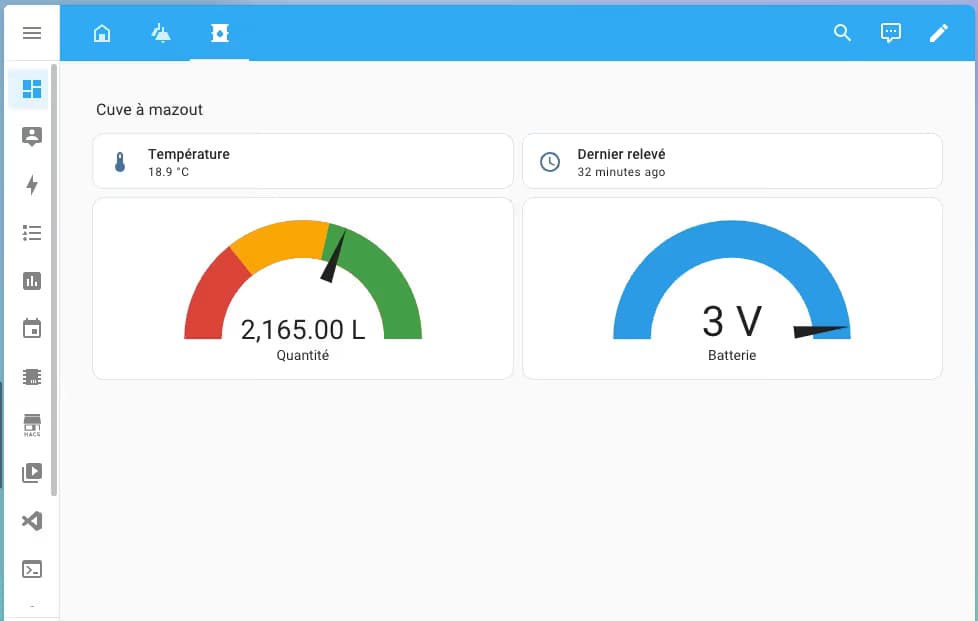
After presenting my connected gauge for the oil tank and sharing the architecture of my smart home hub under Home Assistant, it was time to take it to the next level: developing my own Home Assistant integration.
Why? Because the gauge I’m using, provided by Fullup, doesn’t have an official integration in Home Assistant (yet?). However, Fullup offers a documented REST API — and that’s all I needed to start developing my first custom integration.
Objective: to monitor the oil level from my dashboard
My need was simple: to automatically retrieve the oil level measured by the Fullup gauge and display it in my Home Assistant dashboard.
Instead of cobbling together an automation with RESTful Sensor in the YAML file, I preferred to create a clean integration, in Python, with everything needed: configuration in the UI, well-defined entities, support for API authentication, etc.
A first for me
This is literally my first Home Assistant integration, and I must admit I was quite overwhelmed by their entire framework
- The platform system (sensor, binary_sensor, button, etc.)
- The management of configuration flows via config_flow
- And especially… the patience it requires to read the documentation and get everything working
But in the end, after a few (okay, a lot of) trial and error, I managed to create a stable integration that:
- Is configured via the interface
- Requests Fullup credentials (email + password)
- Retrieves the tank level(s) at regular intervals
- Displays all this as a sensor entity, with the correct attributes


What does it look like in Home Assistant?

Once the integration is installed and configured, you’ll find a device with the following sensors:
- The total volume of the tank
- The current volume
- The battery level
- The date of the last API connection
- The date of the last reading
- The temperature of the tank
It’s perfect for monitoring oil consumption over time, triggering an alert if the level gets too low or if the battery level is too low.
How to install it?
For now, the integration needs to be installed manually; you have to add my git repository https://github.com/zedissime/ha-fullup as a custom repository.
